0001-Retention Policy Cloning between Root and Sub-Organizations – Technical Design Document
Open Questions / Clarifications
- ❓ Is a notification alone sufficient to inform sub-org owners that their existing retention settings have been overwritten?
- Alternative options might include a send email?
- ℹ️ Clarification: When a Root Org performs a “Clone” operation, it will send the latest persisted (saved) retention settings, not any in-progress or unsaved configuration changes made in the UI.
Introduction
Purpose:
This document describes the design for enabling Root Organizations to clone Retention Period configurations across their Sub-Organizations within Appcircle.
Currently, each organization must manually configure retention settings for each module (e.g., Build Artifacts, Testing Distribution, Publish to Stores, Enterprise App Store). The new feature allows the Root Organization to replicate its existing configuration to selected sub-organizations in a one-time, stateless operation, ensuring consistency and reducing repetitive manual setup.
Scope:
This enhancement covers:
- Extending the Artifacts settings UI to support retention configuration cloning.
- Updating License Service to receive, validate, and apply cloned configurations.
- Introducing a one-way replication flow from Root → Sub-Organizations.
System Overview
The feature enables Root Organization owners to initiate a clone operation that replicates their retention configuration to selected sub-organizations. The cloning process:
- Pushes the current configuration from root to selected sub-orgs.
- Overwrites any existing sub-org settings.
- Does not maintain a continuous sync; each clone action is independent.
Key Components
1. Artifacts Module
- Purpose: Provide the Root Org UI for managing and cloning retention configurations.
- Responsibilities:
- Display current retention settings per module.
- Allow selection of sub-organizations.
- Send cloning requests to the License Service API.
- Interactions:
- Sends RetentionConfigCloned event to License Service.
- Data Flow:
- User → UI → License Service → Kafka Event → License Service → Mongo.
- User → UI → License Service → Kafka Event → Notification Service -> UI -> Sub-Org
Detailed Design
User Interface (if applicable)
Design Overview:
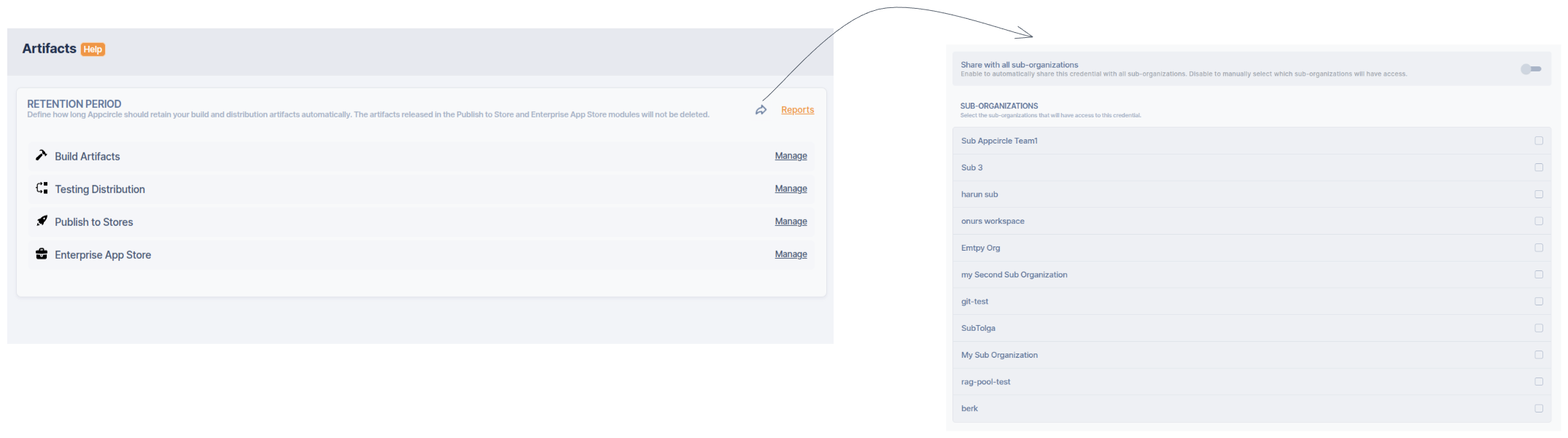
UI Behavior:
- A new Clone Settings button appears in the Retention Period section (visible only to Root Org).
- Clicking opens a modal:
- Clone current retention settings to selected sub-organizations.
- Option to select individual sub-orgs or toggle All Sub-Orgs.
- Confirmation dialog:
- This operation will overwrite retention settings in selected sub-organizations. Proceed?
- Upon confirmation, clone request is sent and a success message displays:
- Retention settings successfully cloned to 8 sub-organizations.
- Sub-orgs receive a notification banner:
- Retention settings were updated by Root Organization.
Deployment and Infrastructure
Cloud Deployment
There are no additional items for cloud deployment.
Self-Hosted Deployment
There are no additional items for Self-Hosted deployment.
Testing and Quality Assurance
Test Scenarios:
- Clone initiated with selected sub-orgs.
- Clone initiated with “All Sub-Orgs.”
- Existing sub-org settings overwritten.
- Audit record created after clone.
- Notification event sent to sub-org owners.
Performance Considerations
There does not appear to be any issues that could affect performance for this analysis.
Risks and Mitigation Strategies
| Risk | Description | Mitigation |
|---|---|---|
| Data Overwrite | Sub-org settings accidentally overwritten | Confirmation prompt & audit trail |
| Conflicts | Root and Sub-org edits at same time | Conflict resolution with timestamp priority |