Testing Distribution Module – Next-Generation Architecture Analysis
Status: Proposed / Future work. This document analyzes the current Testing Distribution module and proposes a redesigned, alternative distribution module. It does not describe a currently implemented system.
1. Introduction and Overview
1.1 Module Purpose
The Testing Distribution module is the structure that allows application files to be shared between teams for testing purposes.
Application files mostly consist of APK and IPA, but other operating systems (e.g. .app for HarmonyOS) may have different file types.
Applications are distributed between teams to be tested manually. Therefore, this testing process needs to be tracked and managed.
1.2 Current State of the Module
A Profile consists of two structures: Android and iOS. While this structure prevents extensibility, it also applies the entire distribution structure to both application file types.
Teams are made up of emails. Groups are formed from emails and are grouped for distribution purposes. After distribution, the team no longer matters, which makes post-distribution checks difficult.
Once a Profile is distributed, there are certain authentication methods available for access. These authentication structures are configured on a per-profile basis. These methods include static, SSO, and LDAP. This module does not have an enrollment feature (using one's own username and password).
Emails sent for distribution purposes contain two types of links: - Download link - Unsubscribe link
These and similar link structures are long and not suitable for sharing. Therefore, short-link redirection would be more appropriate.
The licensing model is based on a monthly license according to the number of emails sent.
1.3 Module Redesign Goal
Provide a more controllable and flexible distribution structure with new features. Move to a new infrastructure architecture to enable easier metric, trace, and log tracking. License with a more appropriate licensing model.
- Groups should define an access scope. A person added to a group should be able to access the applications within the group's boundaries, and should lose access once removed.
- Relationships such as the applications a group has access to, or the groups a tester belongs to, should be easier to display to the user.
- License structures should be based on the application download count.
- Once added to groups, users should be able to access the relevant application with their own username and password.
- The structure should be customizable as an externally accessible system.
Desired infrastructure capabilities:
- Better use of metric, trace, and log structures.
- A more understandable design for event management.
- The design should be suitable for architectures such as DMZ.
2. Feature Set
2.1 Features
Profile
- Scope: Covers the transformations and settings required to create and distribute a profile.
- Features:
- Core Feature: Creating/deleting profiles, and adding/removing app versions and settings within them.
- App Parsing: Extracting information from within the application and storing it in association with the profile for later use.
- App Conversion: Converting an AAB file to APK.
- Profile metadata: Ability to upload a file together with meta info.
- Send to EAS: The application can be sent for EAS distribution.
- Resign Binary: The application can be sent for resigning. After the resign operation, the logs must be stored and displayed.
- Auto Notify: Sends notifications to testers whenever a new version arrives.
- User Story:
User: Refers to a user using Appcircle.
Tester: Refers to a user testing the distributed application.
- As a user, I can create an empty profile. I can use this profile later on.
- As a user, I can manually upload my application to a profile.
- As a user, I can send the application to a profile with some metadata from the build module.
- As a user, I can see info extracted from the application I uploaded.
- As a user, the AAB file I uploaded should be converted to a suitable format that can be installed on the tester's phone during distribution.
- As a user, I can download the original or the APK-converted version of the AAB file I uploaded.
- As a user, I can send the application I uploaded to EAS.
- As a user, I can send the AAB file I uploaded as an enterprise app store APK.
- As a user, I can re-sign the application I uploaded. The re-signed application is recorded as a new version.
- As a user, I can generate a QR code for the application I uploaded. I can distribute this QR code or link through other channels.
- As a user, just as I can distribute a profile, I can also distribute a single version.
- As a tester, I can receive the application download link by email. I can download the application via email using the selected authentication method.
- As a tester, I can receive the application through channels other than email. In that case, I can only download this application.
- As a user, I can enable auto notify on a profile. In that case, a notification is sent to the groups the profile is shared with whenever a new version is uploaded.
- As a user, I can pin profiles. These pins are specific to the user only.
- Dependencies:
- App Parser Service: A service that helps extract information from within the application.
- Resign Service: The structure that signs the application.
- Performance Requirements:
- An application is typically distributed to an entire group at once, and downloads begin shortly after distribution. The application download process must be prepared for concurrent users.
- Application sizes can reach up to 2 GB. The upload stage must be resilient.
Group
- Scope: Covers the creation of a group, adding new testers, and recording authentication option settings.
- Features:
- Core Feature: Creating/deleting groups, adding testers, and storing the authentication structure.
- LDAP import Feature: Synchronizes testers from LDAP groups into tester groups.
- User Story:
- As a user, a group can be created and testers can be added to it.
- As a user, I can select an authentication method for each group. These methods can be none, static, SSO, LDAP, or enrollment.
- As a user, I can send an application to an individual email. In this case, this person is registered into groups as a single-person group.
- As a tester, when I am added to a group, an invite is sent for me to accept. If I do not accept, no further emails are sent regarding the shared application.
- As a tester, I can leave a shared group via the unsubscribe feature in incoming emails.
- Dependencies:
- Keycloak
Group, App and Tester Relation
- Scope: Covers displaying the relationships between Groups, Apps, and Testers, and the related actions.
- Features:
- Core Feature: The feature that enables reaching the application from a group, and reaching the tester from a group.
- User Story:
- As a user, I should be able to see the applications shared with a group.
- As a user, I should be able to see the testers within groups.
- As a user, from the tester page I can see the groups and apps the tester belongs to.
- As a user, I can remove a tester from groups from the tester page.
Download Count License
- Scope: Covers the licensing of the Testing Distribution module's usage.
- Features:
- Core Feature: A feature that performs monthly licensing based on download count.
- User Story:
- As a user, applications can be sent to testers up to the download count specified in the limits.
- Dependencies:
- Keycloak
- Performance Requirements:
- Ensuring the license check is kept separate from the download system and designed so that it does not affect performance.
Device Registration
- Scope: This feature is responsible for obtaining the device ID to register iOS devices ("Apple Devices") and forwarding it to the relevant module.
- Features:
- Core Feature: Showing the user the appropriate screen when the incoming email is clicked, and then sending the UUID to the relevant module.
- User Story:
- As a user, I should be able to register the device information required to install the application on my device.
- Dependencies:
- Signing Identity Service
Customize & Localize
- Scope: Covers organization-based localization and customization capabilities for the visual elements and text of the Tester Web page.
- Features:
- Core Features: Covers recording and modifying the customization and localization features applied.
- User Story:
- As a user, I should be able to customize the visuals of the pages the tester will see.
- As a user, I should be able to customize the text of the page the tester will see via localization.
- As a user, we should be able to add as many languages as we want for the pages the tester will see.
- As a user, the URL of the tester page should be changeable.
Activity Report
- Scope: Covers the record of who did what and when regarding changes made to the Testing Distribution module.
- Features:
- Core Features: Covers report display and export steps.
- User Story:
- As a user, I should be able to see all change operations within the last 2 years.
- As a user, I should be able to see all changes within the last 2 years as CSV.
App Sharing Report
- Scope: Covers reporting of downloads made through Testing Distribution.
- Features:
- Core Features: Covers report display and export steps.
- User Story:
- As a user, I should be able to see download operations and their details within a specific time range.
- As a user, I should be able to get CSV exports of download operations within a specific time range.
Tester Web Portal
- Scope: Covers the parts from tester login to application download.
- Features:
- Core Features: Login, download, navigation.
- SSO: Single Sign On: Integration with the company's own single sign-on system.
- LDAP Login: Enables login via LDAP through user configuration.
- Enrollment: Logging the user in via social login.
- User Story:
- As a tester, I can log in from the login page with the option I want. In this case, I can see all versions of profiles shared via email, or applications shared as a single version.
- As a tester, I want to see a guide on how to install the application after downloading it on Apple devices.
- As a tester, I can see and download all applications and versions shared with me.
- As a tester, I can see notes about an application version.
- As a tester, I can log out and sign in with a new account.
Questions:
- How should the auth structure work when trying to download the application via QR code? The QR code and link will only be related to distribution. Login will be a separate step.
- Should the application be named "Profile" or "App"? It will remain "Profile".
- Since there is no direct link between groups and an application, an application can be shared with multiple groups. The same person may be associated with different auth structures in different groups. How can this be resolved? In AppCenter, groups exist within the same app. In the first step, the auth type will be selected, and login will happen afterward.
- The Mixed Auth structure must follow certain rules — for example SSO or enrollment, static or enrollment. If a share is made with something like static or SSO, we will need to resolve situations such as similarities in usernames. A single group has a single auth mechanism.
- Will apps shared with a tester be visible? Tester → Group and Tester → App.
- Will we have a Release Type tag feature such as alpha, beta, etc.? No.
- Will there be in-app update and mandatory update features? Not at this time.
- Will systems such as social login be used in the enrollment step? (Needs to be discussed with Eren.) The enrollment step is generally implemented via social login, as is the case with our competitors.
3. Technical Analysis
3.1 Current Architecture Analysis
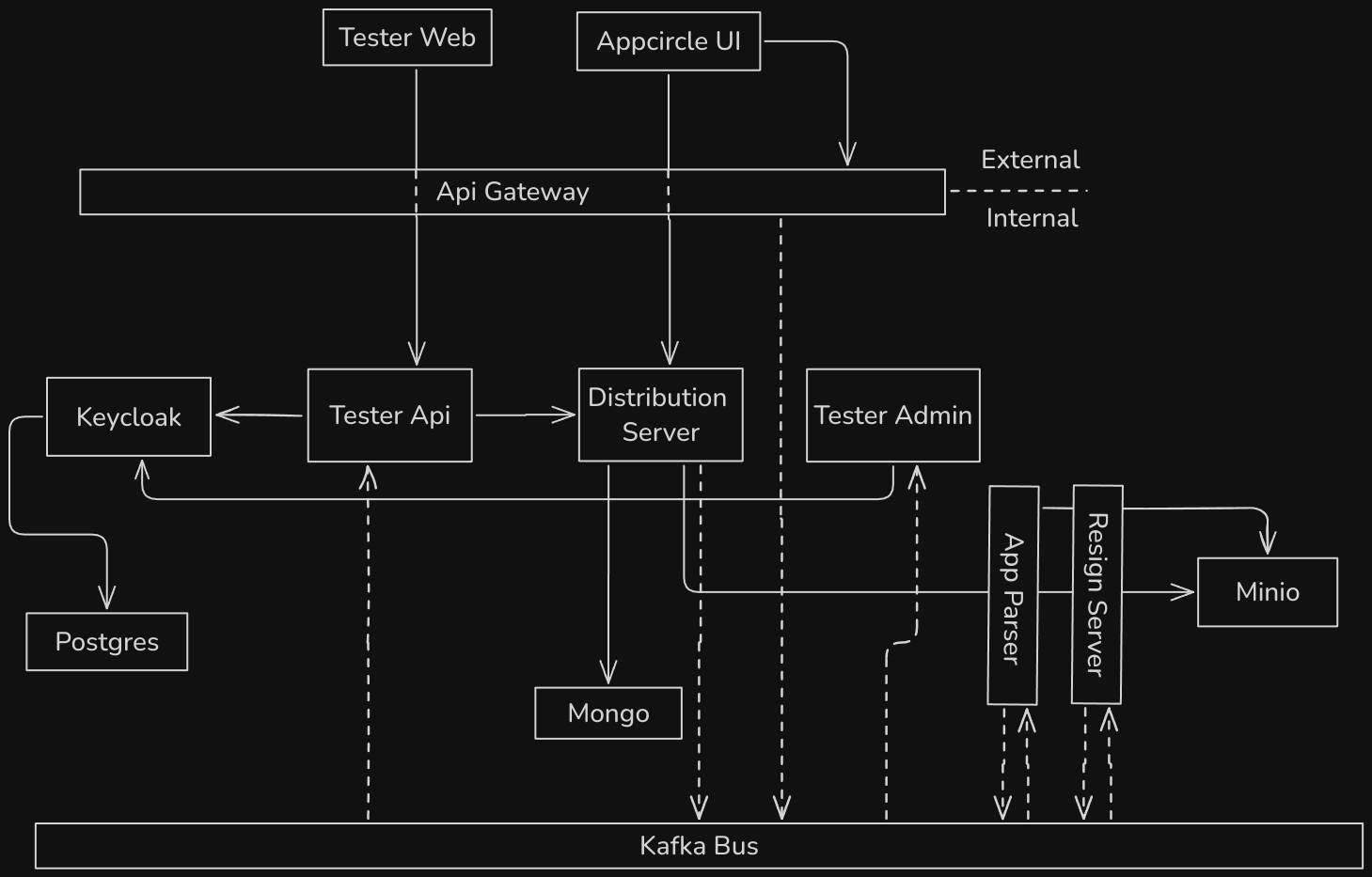
Profile Create Flow
- A request comes in from the Appcircle UI.
- After upload, the Distribution Server saves the file to Minio and fires an event.
- App Parser extracts information and files from within the app and sends a new event.
- The Distribution Server continues processing with the event coming from App Parser.
- Once all information has arrived, it is saved to Mongo.
SSO Flow
- The user configures and saves the SSO settings.
- The SSO settings are sent to the Keycloak server.
- While Keycloak returns a response, the API Gateway intercepts it and fires an event related to the SSO settings.
- Tester Admin catches this event and creates the necessary mappers and settings.
- The user enables these settings on an Appcircle profile.
- The tester enters via the email sent to the Tester Web system.
- The SSO settings are retrieved via the profile ID in the URL.
- An SSO redirect link is sent.
- The user is redirected to the identity provider offering SSO, and after the operations there, the return goes to the API Gateway.
- The API Gateway redirects to Keycloak, and Keycloak returns the final redirection response URL to go to.
- The return to the Tester Web system is provided along with the auth token.
- Using this token, an access token is obtained and processing continues.
API Authentication Flow
- A token is obtained using the OpenID protocol.
- The token is sent via the header.
- The API Gateway validates the token based on its structure.
- The API Gateway asks Keycloak for the scope information of the endpoint being accessed.
- Keycloak returns the authorization information.
- The API Gateway routes the traffic to the internal network based on the validation information.